

Data Analyst Skills You Need to Start Your Career: 10 Key Skills
Data Analyst Skills You Need to Start Your Career: 10 Key Skills
Every business today collects data: sales figures, customer feedback, website visits, inventory counts, student results. But raw numbers on their own do not help anyone. Someone has to clean them, study them and explain what they mean in plain language. That person is a data analyst.
If you are a student, a fresher or a working professional thinking about a career change, you have probably searched for the data analyst skills employers actually look for. The list online can feel overwhelming: Excel, SQL, Python, statistics, dashboards, machine learning. Where do you start, and what can you skip for now?
This guide answers that question. We will walk through the 10 key skills you need to start your career as a data analyst, explain why each one matters, show simple examples and give you a practical roadmap. If you live in Gujarat and are exploring computer courses in Vadodara, we have also added a section on how to choose the right training and what to look for locally.
What Does a Data Analyst Actually Do?
Before listing skills, it helps to understand the job. A data analyst takes information from different sources, checks it for errors, organises it, looks for patterns and presents the findings so that managers can make better decisions.
Here is a simple example. Imagine a retail shop on Alkapuri Road that wants to know why sales dropped in the last quarter. A data analyst would:
- Collect the sales records, from billing software or spreadsheets.
- Clean the data by removing duplicate bills and fixing wrong entries.
- Compare sales by month, product category and customer type.
- Find that a popular product category was out of stock for three weeks.
- Present this in a short report with a chart, and suggest better stock planning.
Notice that the job is not only about numbers. It involves curiosity, logic and the ability to explain. The skills below cover all of these.
Quick Overview: 10 Key Data Analyst Skills
| # | Skill | What it is used for | Difficulty for beginners |
|---|---|---|---|
| 1 | Microsoft Excel | Organising, calculating and summarising data | Easy |
| 2 | SQL | Pulling data from databases | Easy to moderate |
| 3 | Statistics basics | Understanding patterns and averages | Moderate |
| 4 | Python (or R) | Automating analysis and handling large data | Moderate |
| 5 | Data cleaning | Fixing errors and missing values | Easy to moderate |
| 6 | Data visualization | Turning numbers into charts | Easy |
| 7 | Power BI or Tableau | Building interactive dashboards | Moderate |
| 8 | Critical thinking | Asking the right questions | Grows with practice |
| 9 | Communication | Explaining findings to non-technical people | Grows with practice |
| 10 | Business understanding | Connecting data to real decisions | Grows with practice |
1. Microsoft Excel
Almost every analyst career begins with Excel. It is installed on most office computers, and many small and mid-sized businesses still run their reporting through spreadsheets.
What to learn:
- Formulas such as SUM, AVERAGE, IF, COUNTIF and SUMIF
- Lookup functions such as VLOOKUP and XLOOKUP
- Sorting, filtering and conditional formatting
- Pivot tables and pivot charts
- Basic data validation
Example: Suppose you have 5,000 rows of monthly orders. A pivot table can show total sales by city in under a minute, a task that would take hours by hand.
Tip: Do not just watch tutorials. Download a free sample sales dataset and build a monthly report from scratch. Practising on a real file teaches you more than any video.
2. SQL (Structured Query Language)
Most company data is stored in databases, not spreadsheets. SQL is the language used to ask those databases questions. It is one of the most requested skills in data analyst job descriptions, and it is also one of the easiest programming languages to pick up.
What to learn:
- SELECT, WHERE, ORDER BY and LIMIT
- GROUP BY and aggregate functions such as COUNT, SUM and AVG
- JOINs to combine tables
- Subqueries and basic window functions
Example: A query like “show the total sales for each product category in the last three months” can be written in about four lines of SQL.
Tip: Practise writing queries every day for 20 minutes. Short, regular practice builds confidence faster than long weekend sessions.
3. Statistics Basics
You do not need a maths degree to be an analyst, but you do need to understand a few core ideas. Statistics helps you avoid wrong conclusions.
What to learn:
- Mean, median and mode, and when to use each
- Standard deviation and variance
- Percentages, ratios and growth rates
- Correlation (and why correlation is not the same as causation)
- Basic probability and sampling
- Introduction to hypothesis testing
Example: If a few customers place extremely large orders, the average order value looks high, but the median gives a more honest picture of a typical customer. Knowing which to report is a statistics skill.
4. Python (or R) for Data Analysis
Excel and SQL will get you your first job in many cases. Python helps you grow faster. It lets you handle large files, automate repetitive tasks and create more advanced analysis.
What to learn:
- Python basics: variables, lists, loops and functions
- Pandas for working with tables of data
- NumPy for numerical calculations
- Matplotlib or Seaborn for charts
- Reading CSV and Excel files
Example: If you receive twelve monthly Excel files, a short Python script can merge all of them into one clean table in seconds.
Tip: Learn Python after you are comfortable with Excel and SQL. Understanding the logic of data first makes the coding much easier.
5. Data Cleaning and Preparation
Experienced analysts often say that most of their time goes into cleaning data, not analysing it. Real-world data is messy. Names are spelled in different ways, dates are in mixed formats, and some cells are simply empty.
Common cleaning tasks:
- Removing duplicate records
- Handling missing values (deleting, filling or flagging them)
- Fixing inconsistent text, such as “Vadodara”, “vadodara” and “Baroda”
- Standardising date and currency formats
- Spotting outliers that look like typing mistakes
Why it matters: If the input data is wrong, even the most beautiful dashboard will mislead people. Employers value analysts who check their data before presenting it.
6. Data Visualization
A chart can explain in five seconds what a table takes five minutes to show. Visualization is the skill of choosing the right chart and designing it so the message is clear.
| If you want to show… | Use this chart |
|---|---|
| Change over time | Line chart |
| Comparison between categories | Bar or column chart |
| Parts of a whole | Pie or donut chart (use sparingly) |
| Relationship between two numbers | Scatter plot |
| Distribution of values | Histogram |
Good habits:
- Give every chart a clear title that states the point
- Avoid too many colours
- Remove clutter such as heavy gridlines
- Label axes and units
7. Power BI or Tableau
Once you can analyse and visualize data, the next step is to build dashboards that update automatically and let managers explore the numbers themselves. Power BI and Tableau are the two most widely used tools. Power BI is a popular starting point because it works smoothly with Excel and has a free desktop version for learning.
What to learn:
- Connecting to Excel, CSV and database sources
- Cleaning data in Power Query
- Creating relationships between tables
- Writing simple DAX measures (in Power BI)
- Designing a one-page dashboard with filters and slicers
Tip: Pick one tool and learn it well. Employers prefer a candidate who is strong in one tool over someone who has only touched three.
8. Critical Thinking and Problem Solving
Tools can be learned in a few months. Thinking like an analyst takes practice, and it is what separates a good analyst from someone who just makes charts.
Critical thinking means:
- Asking “why” before opening the data
- Checking if the numbers make sense
- Looking for more than one explanation
- Questioning your own assumptions
Practice exercise: Take any news headline that quotes a statistic, for example “online shopping has doubled.” Ask yourself: doubled compared to when? Measured how? Who was included? This habit builds analytical thinking quickly.
9. Communication and Storytelling
An insight that nobody understands has no value. Analysts regularly present findings to managers, sales teams or clients who are not technical. You need to explain results simply and honestly.
A simple structure for presenting findings:
- Question: What were we trying to find out?
- Finding: What does the data show?
- Reason: Why do we think this happened?
- Action: What should the business do next?
Tip: Practise explaining your analysis to a friend or family member who has no technical background. If they understand, you are on the right track. Also work on your written English and email writing, since reports and summaries are part of daily work.
10. Business and Domain Understanding
The best analysts understand the business they work in. A data analyst in a hospital needs to know how patient flow works. One in a manufacturing company should understand production cycles and quality checks.
This matters in a city like Vadodara, which has a strong base of engineering, chemicals, pharmaceuticals, education and a growing IT and services sector. Analysts who understand how these industries operate, such as tracking inventory, production output or student admissions, are more useful from day one.
How to build it: Read industry news, follow company annual reports, ask questions during internships and always connect your analysis to a business goal such as saving cost, increasing sales or improving customer experience.
A Simple Learning Roadmap for Beginners
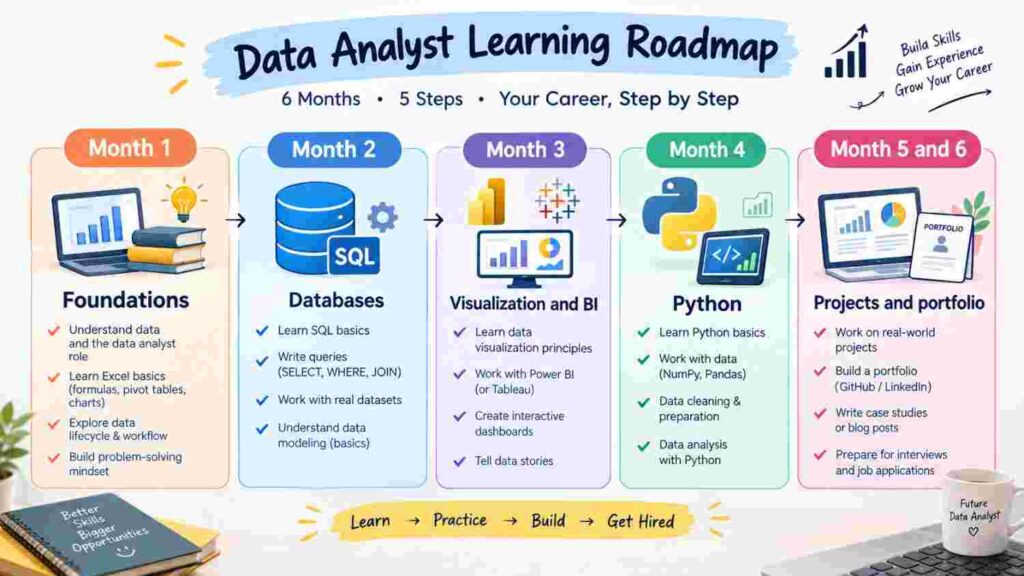
You do not need to learn everything at once. This step-by-step plan works well for most freshers.
Month 1: Foundations Learn Excel properly, including pivot tables and lookup functions. Start learning basic statistics.
Month 2: Databases Learn SQL. Practise on sample databases and write at least 50 different queries.
Month 3: Visualization and BI Learn data visualization principles and start Power BI. Build your first dashboard.
Month 4: Python Learn Python basics, Pandas and charting. Clean a messy dataset from start to finish.
Month 5 and 6: Projects and portfolio Complete three to four real projects. Build a portfolio, update your resume and LinkedIn profile, and begin practising interviews.
The timeline can be shorter or longer depending on how many hours you can give each day. What matters most is steady practice.
Projects That Impress Employers
Certificates help, but projects prove you can do the work. Here are some beginner-friendly project ideas:
- Sales performance dashboard: Analyse sales by region, product and month.
- Customer feedback analysis: Clean survey responses and find common complaints.
- HR attrition report: Study why employees leave and which departments are affected.
- Student results analysis: Compare performance across subjects and batches.
- Local market study: Compare prices of a product across different shops or online platforms.
Upload your work to GitHub or a simple portfolio page, and write two or three lines about the problem, the method and the result for each project.
Choosing Computer Courses in Vadodara for Data Analytics
If you prefer guided learning over studying alone, a structured classroom or hybrid programme can save you months of confusion. When comparing computer courses in Vadodara, check these points before you enroll:
- Complete curriculum: Does the course cover Excel, SQL, statistics, Python and Power BI, not just one tool?
- Hands-on practice: Will you work on real datasets and projects instead of only slides?
- Experienced trainers: Can you meet the trainers or attend a demo class first?
- Small batches: Smaller groups mean more doubt-solving time.
- Career support: Look for resume help, mock interviews and portfolio guidance.
- Flexible timings: Useful if you are a college student or a working professional.
- Fees and transparency: Ask for a clear fee structure and syllabus in writing.
At Bright Computer Education, learners interested in data analyst training in Vadodara can explore a practical, step-by-step approach that begins with Excel and SQL and moves toward Python, Power BI and project work. The focus is on building skills that employers look for rather than only covering theory. You can visit the institute’s website to see current course details and batch timings.
Whichever institute you choose, visit in person if possible, talk to current students and attend a trial session. A good course should make you comfortable asking questions.
Common Mistakes Beginners Make
- Learning too many tools at once. Master the basics before moving on.
- Only watching videos. Skills come from doing, not watching.
- Ignoring statistics. Without it, your conclusions may be wrong.
- Skipping data cleaning practice. Real data is never perfect.
- No portfolio. A resume without projects gives employers little to judge.
- Neglecting communication. Technical skill alone rarely gets you hired.
- Waiting to feel “ready.” Start applying for internships and entry-level roles while you are still learning.
Entry-Level Roles You Can Apply For
Once you have these skills, you can look for roles such as:
- Junior Data Analyst
- Business Analyst (entry level)
- MIS Executive
- Reporting Analyst
- Operations Analyst
- Data Entry and Data Quality Analyst
- Marketing or Sales Analyst
Many people begin as an MIS executive or reporting analyst and move into full data analyst roles within a year or two as their skills grow.
Frequently Asked Questions (FAQs)
Do I need a degree in IT or mathematics to become a data analyst?
No. Many analysts come from commerce, science, arts and engineering backgrounds. What counts is your skill with the tools, your logic and your project work. A basic comfort with numbers is enough to begin.
Which skill should I learn first?
Start with Excel. It is easy to begin, gives quick results and teaches you how data is organised. Then move to SQL.
Is coding necessary for a data analyst?
SQL is essential for most roles. Python is not always required for entry-level jobs, but it gives you a strong advantage and opens doors to higher-level work.
How long does it take to learn data analysis?
With regular practice of two to three hours daily, most beginners can become job-ready in around four to six months. This varies from person to person.
Power BI or Tableau: which is better for a beginner?
Both are good. Power BI is often easier to start with, especially if you already use Excel. Choose one and build projects with it.
Can a fresher get a data analyst job?
Yes. Freshers are hired every year, especially those who show a portfolio of real projects and good communication skills. Internships and entry-level reporting roles are a common starting point.
How do I choose between different computer courses in Vadodara?
Compare the syllabus, trainer experience, project work, batch size and placement or career guidance. Attend a demo class before paying any fees.
Can I learn data analytics while studying or working?
Yes. Weekend and evening batches, as well as online resources, make it possible to learn alongside college or a job. Consistency matters more than speed.
Final Thoughts
Becoming a data analyst is a realistic goal for anyone willing to learn step by step. Start with Excel, add SQL, understand statistics, and then grow into Python and Power BI. Alongside the technical tools, practise thinking clearly, communicating simply and understanding the business behind the numbers.
Remember that employers hire people who can solve problems, not just people who know software names. Build projects, keep practising and stay curious.
If you are ready to take the next step and want guided support, explore the data analytics programmes at Bright Computer Education and book a demo session to see if the learning style suits you. Your first dashboard may be closer than you think.